Rental Samsung Flip in Warsaw
We rent out the Samsung Flip — a digital flipchart, i.e. an interactive touchscreen 55″ 4K with a stylus — from 1 000 PLN net for the first day (24h), each additional day (24h) at 50% of the rate. You write on the screen, show a presentation from a laptop or phone, and save notes in the screen's memory. We deliver the screen, set it up and commission it on site (delivery with installation from 1 000 PLN net).
- Samsung Flip 55″ 4K — from 1 000 PLN net / day (24h)
- Delivery, installation and technical support
- VAT invoice for companies · rental from one day (24h)
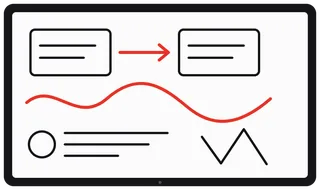 Samsung Flip WM55H 55″ 4Kfrom 1 000 PLN net / day (24h)
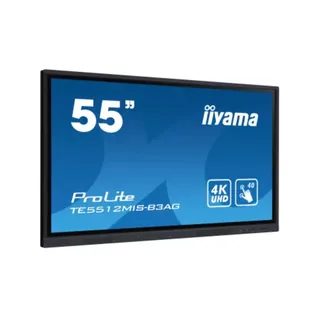 Touch monitor 55″ iiyama TE55900 PLN net / day (24h)
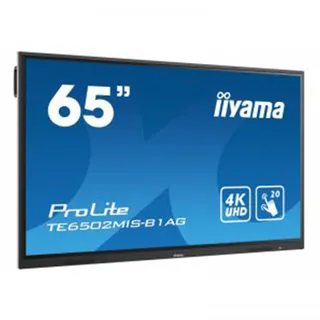 Touch monitor 65″ iiyama TE651 400 PLN net / day (24h)
Samsung Flip rental — pricing
The screens listed in the table are ours and are held at the rental company's depot in Gocław. Prices are quoted net for the first day (24h); each additional day (24h) costs 50% of that rate.
| Screen | Net price / day (24h) | Units | Key features |
|---|---|---|---|
| Samsung Flip WM55H — digital flipchart 55″ 4K | Price: 1 000 PLN | Units: 1 | Key features: stylus, writing app, up to 4 users simultaneously, NFC for Samsung Galaxy phones, screen sharing |
| iiyama TE55 — touch monitor 55″ 4K | Price: 900 PLN | Units: 1 | Key features: 40-point touch, USB-C 65 W, 3× HDMI, Android system with Wi-Fi 6 |
| iiyama TE65 — touch monitor 65″ 4K | Price: 1 400 PLN | Units: 1 | Key features: larger image for the room, multi-point touch |
Price for multiple days (24h)
For multi-day events, we charge the full rate for the first day (24h) and 50% for each additional day (24h). Net amounts for the screen only:
| Screen | 1 day (24h) | 2 days (24h) | 3 days (24h) | 4 days (24h) |
|---|---|---|---|---|
| Samsung Flip 55″ | 1 000 PLN | 1 500 PLN | 2 000 PLN | 2 500 PLN |
| iiyama TE55 | 900 PLN | 1 350 PLN | 1 800 PLN | 2 250 PLN |
| iiyama TE65 | 1 400 PLN | 2 100 PLN | 2 800 PLN | 3 500 PLN |
Delivery and installation is charged once per event. 23% VAT is added to all amounts: the first day (24h) for Samsung Flip is 1 230 PLN incl. VAT, three days (24h) — 2 460 PLN.
We have one Samsung Flip screen, and availability is confirmed in the quote: send an inquiry with the date and venue, or call: +48 788 335 888.
What is included in the price and what you may want to add
Included in the day (24h) rate is the screen ready to use with Samsung styluses and the power cable. The full kit contents, including the USB cable for touch control of a computer, are listed in the handover protocol and confirmed in the quote. Laptop cables and remaining accessories are selected separately (net prices per day (24h)):
- Stage stand — 150 zł. Steel, with a VESA mount, for screens up to 50 kg; compatible with the VESA 400 × 400 mounting pattern of the Samsung Flip.
- HDMI 4K cable: 3 m — 20 zł, 15 m — 50 zł.
- Presentation laptop (MacBook or Windows) — 150 zł; Super Cue Dual remote — 100 zł.
- Sound system and microphones — see sound system rental in Warsaw.
Full service: delivery, installation, and on-site support
You do not need to arrange transport or find a technician. We bring the screen, set it up, connect it to your laptop or phone, and run a full check before the start. During the event you can have a technician on site or use phone support.
- Delivery with installation and dismantling: from 1 000 PLN net. We mount the screen on a booth wall (VESA 400 × 400) or place it on a stage stand (150 PLN net per day (24h), a separate line item in the quote).
- Support during the event: on-site technician (cost provided in the quote) or urgent support at the number +48 788 335 888.
- Delivery and collection within Warsaw: from 300 PLN net.
- Self-collection: 0 PLN — Wał Miedzeszyński 646 b. III, 03-994 Warsaw (Gocław). The screen weighs approx. 29 kg, so two people are required.
- Outside Warsaw: Masovia, up to approx. 100 km from Warsaw — travel costs provided in the quote.
- Prices net + VAT 23%, VAT invoice for company. Office: Mon–Fri 08:00–17:00.
What is Samsung Flip and when to choose it instead of a touch monitor
Samsung Flip is a digital flipchart, i.e. an interactive screen with a stylus and its own app for writing and drawing. In practice it is an interactive whiteboard in the form of a 55″ screen that works without a computer: you walk up, pick up the stylus and write. The iiyama touch monitor has its own system with basic note-taking, but is primarily for displaying content from a computer; Flip is designed from the ground up as a flipchart: a stylus, saved pages and an app in which up to four people can write simultaneously. When you need a screen for presentations or for working in computer applications, the iiyama touch monitor is sufficient. When participants need to write, draw and take notes on a shared screen, choose Samsung Flip.
- Writing with a stylus on the screen — colors, line styles and widths, up to four people simultaneously in the Flip app.
- Pages instead of paper — up to 20 pages in one kit, with scrolling and search.
- Documents on screen — you show slides or a document from a laptop, capture the image and add notes to it with the stylus.
- Password lock — content can be protected with a numeric code.
- Saving in the screen's memory — notes remain on the screen; sending by e-mail requires a configured mail account and network connection, so we set it up before the event.
Samsung Flip WM55H Specifications
| Parameter | Value |
|---|---|
| Model | Samsung Flip WM55H (LH55WMHPTWC) |
| Screen | 55″, 4K UHD 3840 × 2160 |
| Touch | InGlass, Samsung touch stylus; up to 4 people can write simultaneously in the Flip app |
| Connectivity | Wi-Fi, NFC (reader on the side of the screen, for Samsung Galaxy phones), wireless image sharing from Android phones and Windows 10 computers |
| Inputs | HDMI (1×, 4K image at 30 Hz), USB, LAN, RS232 |
| Position | landscape or portrait — orientation sensor, the interface adapts to the orientation; changing orientation requires physically rotating the screen |
| Mount | VESA 400 × 400 |
| Weight | approx. 29 kg |
Specifications are provided according to the manufacturer's specification for model LH55WMHPTWC. The screen is intended for indoor use.
How to connect a phone and laptop to Samsung Flip
Samsung Galaxy phone — via NFC
There is an NFC reader on the side of the screen. The manufacturer states that the feature works with Samsung phones running Android 8.0 or later with NFC enabled: you bring your phone close to the reader and the screen initiates image sharing from the phone (Smart View or Screen Mirroring) without entering codes. We will test this with you on your phone during on-site setup.
Android phone and Windows 10 computer — wirelessly
The screen supports wireless image sharing from Android phones and Windows 10 computers that support Wi-Fi Display (Miracast). Performance depends on the device model, so we test this before the event; if a shared Wi-Fi network is required, we will confirm that with you.
Laptop or computer — via cable
A network-independent method: HDMI cable (video) and USB cable (touch). Touch control works when the laptop image is displayed full-screen in landscape orientation. Without the USB cable, the screen displays the computer's image, but touch does not control the computer. Laptop cables are confirmed in the quote.
iPhone — via an adapter or a laptop
The image from an iPhone can be shown via an HDMI adapter or through a laptop. Wireless sharing from iPhone (e.g. AirPlay) is not listed in this model's specifications, so we do not promise it.
What to rent Samsung Flip for — use case examples
Client workshop and brainstorming
Up to four people can write on the screen simultaneously; ideas are saved and grouped across successive pages. Pages remain in the screen's memory, so you do not need to photograph a paper flipchart.
Conference and panel discussion
The presenter with a Samsung Galaxy phone brings it close to the NFC reader to initiate phone image sharing, or shows a presentation from a laptop. When a question comes from the audience, the presenter writes it with the stylus on the same screen.
Training
You show a presentation from a laptop, capture a selected slide and add notes to it with the stylus. Successive note pages are saved for the duration of the entire training session (up to 20 pages in one set).
Trade show booth
The 55″ touchscreen can display a demo or configurator for visitors: we connect the computer via an HDMI cable and touch via USB. For touch control of the computer, we set the screen to landscape orientation; portrait orientation is primarily for use with the Flip app. Orientation is selected at the time of installation, as changing it requires physically rotating the screen.
Board meeting and hybrid meeting
You run the online meeting on a laptop connected to the screen. Samsung does not list a built-in camera or video conferencing app for this model, so the camera and conference microphone are selected separately. Describe the room and number of participants in your inquiry — we will select the camera and microphone.
Other screens and interactive whiteboards for rental
If you do not need writing on the screen, a 4K TV is sufficient for presentations — see TV rental in Warsaw (40″, 60″, 85″). Do you need more interactive whiteboards or touch monitors? Write to us — we will check availability. Other equipment for the event can be found in our offer multimedia rental in Warsaw.
How to rent Samsung Flip — 4 steps
- Inquiry. Write or call: date and times, venue, what you will use the screen for, which devices you will be connecting (laptop, Android phone or iPhone), wall mount or stand, delivery or personal pickup.
- Offer. On business days we send back an offer: availability for your dates, price for all days (24h), setup and logistics.
- Booking. Upon acceptance of the offer, we confirm the booking in accordance with Terms of Cooperation.
- Installation and pickup. We deliver and install the screen, or hand it over for collection at Gocław. Handover and return are confirmed with a handover document.
Why Media Rental
Frequently asked questions
How much does Samsung Flip rental cost in Warsaw?
From PLN 1,000 net for the first day (24h), i.e. PLN 1,230 including 23% VAT. Each additional day (24h) is 50% of that rate: two days (24h) cost PLN 1,500 net, three days (24h) — PLN 2,000 net (PLN 2,460 including VAT). Delivery with installation, if required, is added separately — from PLN 1,000 net.
What is Samsung Flip and how does it differ from a standard touch monitor?
Samsung Flip is a digital flipchart: a 55″ touch screen in 4K UHD quality with a pen and its own writing application. It replaces a paper flipchart and whiteboard, and does not require a computer to operate. A touch monitor is primarily used to display an image from a computer, while Flip is designed from the ground up as a flipchart: a pen, saveable pages, and an application in which up to four people can write simultaneously. The screen can also be connected to a laptop.
Do you offer interactive whiteboard rental?
Yes. Samsung Flip is an interactive whiteboard in the form of a 55″ screen: you write on it with a pen and save notes in the screen's memory. For laptop-based presentations, we also rent iiyama TE55 touch monitors (PLN 900 net per day (24h)) and TE65 (PLN 1,400 net per day (24h)).
How many people can write on Samsung Flip simultaneously?
Up to four people simultaneously in the Flip app. The display uses InGlass touch technology and Samsung pens.
How to connect a laptop to Samsung Flip and use it as a touch screen?
The image is transmitted via an HDMI cable, and touch input via a separate USB cable. The manufacturer states that touch-based computer control works when the laptop's image is displayed in full-screen landscape mode. Without the USB cable, the screen displays the image but does not control the computer. This type of connection does not require a network. Cables for the laptop are confirmed in the quote.
How to display an image from an Android phone or a Windows computer on Samsung Flip?
From a Windows 10 computer — wirelessly (Wi-Fi Display) or via an HDMI cable. From an Android phone — wirelessly (Smart View or Screen Mirroring, depending on the phone model); via cable only if the phone has USB-C → HDMI video output. Wi-Fi network requirements are agreed with you before the event and verified on-site.
Can an iPhone be connected to Samsung Flip?
The image from an iPhone can be shown via an HDMI adapter or through a laptop. Wireless sharing from iPhone (e.g. AirPlay) is not listed in this model's specifications, so we do not promise it.
Does Samsung Flip have NFC and how to connect a phone via NFC?
There is an NFC reader on the side of the screen. The manufacturer states that the feature works with Samsung phones running Android 8.0 or later with NFC enabled: you bring the phone close to the reader, and the screen initiates image sharing from the phone. Phones from other brands are connected wirelessly or by cable. We verify operation with you during on-site setup.
Can Samsung Flip be positioned vertically?
Yes. The screen has an orientation sensor, and the application interface adapts to portrait or landscape positioning. The orientation is selected during installation, as changing it requires rotating the screen. The manufacturer states that full-screen image from a laptop and touch-based control work in landscape mode — for computer use, position the screen horizontally.
Can notes be saved on Samsung Flip and sent by email?
Yes. Notes are saved in the screen's memory (up to 20 pages per kit). Sending by email requires the screen to be connected to a network and an email account configured on it, so this is agreed with you before the event. Before returning the screen, it is advisable to delete saved materials and email account data; we can assist with this on return.
Does Samsung Flip require internet or Wi-Fi?
When working with HDMI and USB cables, no. Wireless screen sharing requires Wi-Fi enabled on both the screen and the device, and in some cases a shared network; sending notes by email requires a network connection. This will be agreed with you before the event.
Can an online meeting (Teams, Zoom) be conducted using Samsung Flip?
Yes, via a laptop connected to the screen: you launch the online meeting on the laptop, and the screen displays it. Samsung does not list a built-in camera or video conferencing application for this model, so the camera and conference microphone are selected separately.
Can you mount Samsung Flip on a booth wall or on a stand?
Yes. The screen weighs approx. 29 kg and has VESA 400 × 400 mounting. We mount it on a booth wall or position it on a stage stand; the mounting method is confirmed in the quote. Wall mounting to the booth is agreed with the booth builder before installation.
What is the minimum rental period for Samsung Flip?
One day (24h). The delivery or pick-up time and the return time are agreed upon at the time of booking.
Can I pick up Samsung Flip myself?
Yes, personal pickup from our base in Gocław (Wał Miedzeszyński 646) costs PLN 0. The screen weighs approx. 29 kg, so two people are needed for transport. Delivery within Warsaw costs from PLN 300 net.
Do you deliver Samsung Flip outside Warsaw?
Yes, within Mazovia — up to approx. 100 km from Warsaw. The cost of travel outside Warsaw is specified in the quote.
Do you have Samsung Flip in other sizes or more than one unit?
We permanently stock one Samsung Flip WM55H 55″ screen and iiyama touch monitors in 55″ and 65″ (one unit each). For other sizes or a larger number of screens, contact us — availability and pricing will be confirmed in the quote.
Ask about Samsung Flip rental for your date
Write with the date and location where you need the screen, what you will use it for (workshop, training, booth, conference), which devices you will be connecting, and whether we should mount it on a wall or on a stand. On business days, we respond with a quote including availability and the full net price for all days (24h).
E-mail: [email protected]